

Windows Method:
Download the IBO PRO PLAYER app using this URL: https://rb.gy/8beuu
Mac Method:
Download the IBO PLAYER app using this URL: https://iboplayer.com/app_downloads/iboPlayer.dmg
Note:
✅ Install – Activate – Enjoy
After installation, simply open the app and send us your MAC + Key to unlock your playlist.
🎁 7 days free trial – after that, you can purchase a lifetime license.
Thanks to our partnership with the provider, you’ll receive a 20% discount on the official price! → Contact us
Install IPTV on the Fire TV Stick
Note:
✅ Install – Activate – Enjoy
After installation, simply open the app and send us your MAC + Key to unlock your playlist.
🎁 7 days free trial – afterwards, you can purchase a lifetime license.
Thanks to our partnership with the provider, you’ll receive a 20% discount on the official price! → Contact us
How to set up IPTV on Android with IBO Pro Player TV / IBO XPlayer / IBOSS IPTV
Choose whichever app you prefer:
Download IBO Pro Player TV from this URL:
https://play.google.com/store/apps/details?id=com.rifftica.proplayerpulseDownload IBO XPlayer from this URL:
https://play.google.com/store/apps/details?id=com.eedvistore.iboexplayerDownload IBOSS IPTV from this URL:
https://play.google.com/store/apps/details?id=com.laalten.oochomaut
Note:
✅ Install – Activate – Enjoy
After installation, simply open the app and send us your MAC + Key to unlock your playlist.
🎁 7 days free trial – afterwards, you can purchase a lifetime license.
Thanks to our partnership with the provider, you’ll receive a 20% discount on the official price! → Contact us
How to set up IPTV on Apple/iOS with IBO Pro Player TV / IBO XPlayer / IBOSS IPTV
Choose whichever app you prefer:
Download IBO Player from this URL:
https://apps.apple.com/us/app/ibo-player/id1547652240Download IBO Player Pro from this URL:
https://apps.apple.com/us/app/ibo-player-pro/id1669696096
Note:
✅ Install – Activate – Enjoy
After installation, simply open the app and send us your MAC + Key to unlock your playlist.
🎁 7 days free trial – afterwards, you can purchase a lifetime license.
Thanks to our partnership with the provider, you’ll receive a 20% discount on the official price! → Contact us
Step 1: You can download IBO Player Pro / IBO Player from the TV store on your Samsung, LG, … device.
Step 2: After installation, open the app. In IBO Player Pro and IBO Player, you will find the MAC address and the device key.
Example:
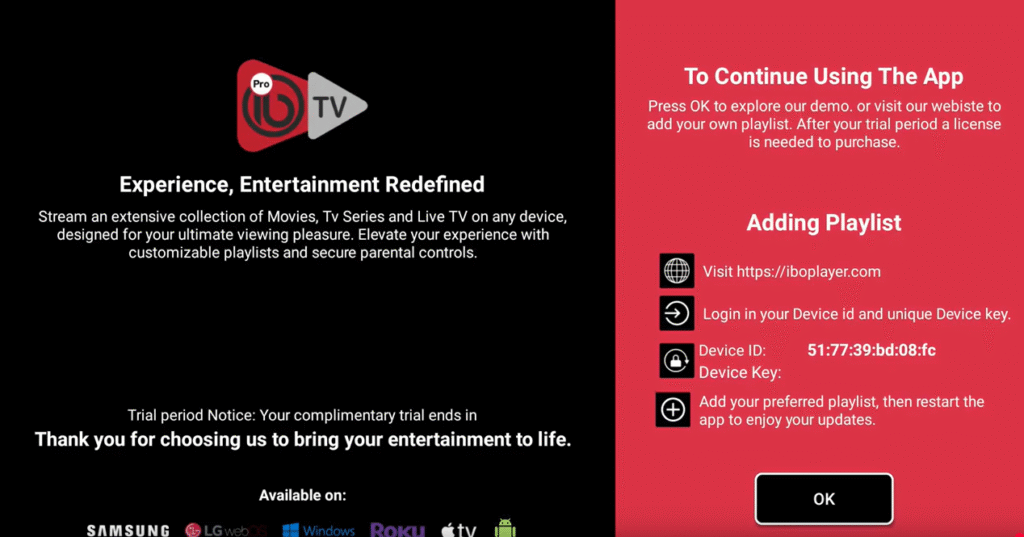
Step 3: Send us the MAC address + key via WhatsApp/Email.
Step 4: After a few minutes, restart your TV and open the app again.
Done! ✅
Installing IBO Player / IBO Player Pro on Apple TV
The installation of IBO Player / IBO Player Pro on Apple TV is a little different, since it is done via the Apple App Store:
Step 1: Open the Apple App Store on your Apple TV. Search for IPTV apps (e.g., IBO Player / IBO Player Pro). Select the app you want and install it.
Step 2: After installation, open the app. In IBO Player Pro and IBO Player, you will find the MAC address and the device key.
Example:
Step 3: Send us the MAC address + key via WhatsApp/Email.
Step 4: After a few minutes, restart your TV and open the app again.
Done! ✅
Step 1: Send us the MAC address of your MAG device via WhatsApp or Email.
Step 2: After payment is completed, we will send you the portal link.